How to Use a Thickness Planer
To learn how to use a thickness planer, start with a flat reference face down and light passes until the board reaches your target thickness. Follow the manual's stock limits, support long boards, collect chips, and measure after each pass.
On this page (10 sections)
- How do you use a thickness planer step by step?
- What should you check before planing a board?
- How should you set up the planer and board supports?
- How deep should each planer pass be?
- How do you feed wood without causing tear-out?
- Which planer fits your boards and workflow?
- How do you reduce snipe at board ends?
- How do you keep chips and knife wear under control?
- Which common mistakes waste the most wood?
- How should you choose and use your first thickness planer?
To learn how to use a thickness planer, start with a flat reference face down, take light passes, and measure after the board clears the machine. Stop at your target thickness rather than chasing every surface mark.
A planer makes the upper face parallel to the face on its bed. It reduces thickness, but a bowed or twisted board needs a flat reference face first.
How do you use a thickness planer step by step?
Start with sound stock, level support, and a shallow cut. Let the feed rollers move the board while you keep your hands outside the openings.
- Read the manual and confirm the board meets all width, thickness, and minimum length limits.
- Inspect every face and edge for metal, grit, loose knots, and splits.
- Flatten and mark one reference face before thickness planing.
- Secure the machine, set up board supports, and connect dust collection.
- Measure the thickest part of the board and set a light first cut.
- Start collection and the planer, then wait for operating speed.
- Feed from the marked infeed side with the reference face down.
- Support the board without pushing or pulling against the rollers.
- Measure after it clears, then adjust for another pass.
Wear eye and hearing protection, tie back long hair, and secure loose clothing. Don't wear gloves near moving rollers or cutters.
If stock stalls or the machine makes an unusual sound, switch it off. Wait for movement to stop and disconnect power before investigating.
What should you check before planing a board?
Use clean lumber with a stable reference face and enough thickness left for your project. Removing a deep defect may leave a board too thin to use.
Inspect reclaimed wood especially closely because fasteners can hide below the surface. A metal detector can help find hidden metal, but it doesn't replace a careful visual check.
Reject stock with loose knots, deep splits, or contamination. Don't feed wet or frozen wood unless your machine's manufacturer permits it.
Check flatness with a straightedge and winding sticks. A face that rocks on the bed cannot guide a reliable cut, even if the rollers press it down.
A jointer creates that first flat face; read what a jointer is used for if you're preparing rough lumber. A properly built planer sled is another option, provided the board is secured and supported against rocking.
How to use a thickness planer for rough lumber
Prepare rough lumber by flattening one face and marking it clearly. Plane the opposite face until it is clean and parallel, while checking your remaining thickness.
Once both faces are flat, you can turn the board over for light cleanup passes. Don't alternate faces while one still rocks or rests on a high spot.
Our planer vs jointer guide explains which machine handles each part of this process.
How should you set up the planer and board supports?
Secure the planer to a stable bench or stand, then leave clear space for the whole board on both sides. Include room for your body and the dust hose.
With power disconnected, check the tables and support alignment as the manual directs. Long boards need separate supports set to carry their weight without tipping them upward.
A stand that is too high can lift the board off the bed; one that is too low lets it sag. Neither problem is solved by holding the board harder.
Keep the board's travel path clear of walls, cords, and stored tools. Our benchtop workshop setup guide helps you plan this space before choosing a permanent machine location.
How deep should each planer pass be?
Use shallow cuts, especially on wide boards, hard wood, or changing grain. Maximum cutting depth is a ceiling, not the best setting for every pass.
Begin from the board's thickest point so a raised area doesn't meet a much deeper cut than expected. A pass that barely touches lower areas can be normal while the upper face becomes parallel.
The WEN PL1326 has a material removal gauge and depth stop. These help you judge a cut and repeat a setting, but calipers still confirm the finished thickness.
For several matching boards, work the whole batch through each setting before lowering the cutterhead. Mark finished pieces so they don't receive an extra pass by mistake.
Leave a little material for final sanding or scraping. A planer can size the board while still leaving shallow cutter marks that need cleanup.
How do you feed wood without causing tear-out?
Feed with the grain where possible, using the grain-direction guidance in your machine manual. Keep the reference face down and let the rollers control travel.
Stand to one side of the board's path. Keep fingers outside the openings, and never reach through to catch a board or clear shavings.
Changing grain can tear even when most of the board cuts cleanly. After the board clears, try a shallower cut or reverse its feed direction if that better follows the grain.
Don't keep taking deep passes to remove torn areas. Check whether enough thickness remains, then consider scraping or sanding the affected patch.
Avoid end-grain boards in a benchtop thickness planer because they can break apart under the cutterhead. Don't feed short offcuts or use adjacent pieces to bypass minimum stock limits.
Which planer fits your boards and workflow?
Choose by board width, cutter maintenance, and setup needs before comparing motor figures. Both planers here have 15-amp motors, so amperage alone doesn't separate them.
Craftsman CMEW320 for straightforward thickness work
The Craftsman suits buyers whose boards fit its 12.25-inch cutting width and who prefer a two-knife cutterhead. Its quick-change knives are double-edged and reversible, giving you another cutting edge before replacement.
That design fits a shop that wants to size boards without managing many small blades. Skip it if your usual stock exceeds its width or if you specifically want a spiral cutterhead.
Its vacuum port gives you a connection point for chip collection. Check hose compatibility and collection requirements before setting up your workspace.
WEN PL1326 for wider stock and guided adjustments
Choose the WEN for 13-inch-wide stock, onboard cut guidance, and a spiral cutterhead with 26 staggered, rotatable HSS blades. It accepts boards up to 6 inches thick.
Its height-adjustable infeed and outfeed tables let you tune board support. The cutting system suits buyers willing to maintain individual blades rather than a pair of long knives.
Skip it if you need variable feed speed, since this is a one-speed machine. Also allow for its roughly 81-pound weight if your plan involves moving it between storage and a bench.
For another comparison before buying, read WEN PL1326 vs DeWalt DW735. Our broader thickness planer guide explains which features matter for your boards and workspace.
How do you reduce snipe at board ends?
Reduce snipe with level board support and correct table adjustment. Snipe is a deeper cut near an end as the board's support changes during feeding.
Avoid lifting the trailing end or allowing the leading end to drop. Set supports before starting so you aren't trying to correct the board's position mid-pass.
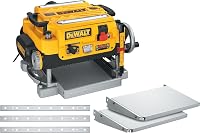
The DeWalt DW7351 is a support accessory for a DW735, not a planer. It includes 2 detachable, folding aluminum tables and mounting hardware.
Buy these tables if you already have a DW735 that needs them. Skip them for the Craftsman or WEN, and remember that table extensions don't replace separate supports for long lumber.
Leave extra board length to trim if snipe remains after adjustment. Read how to stop snipe on a planer before removing more thickness in an attempt to erase it.
How do you keep chips and knife wear under control?
Connect suitable dust collection before every session and inspect cutting edges when cut quality changes. Chip buildup and dull edges can spoil work even when the depth setting is sensible.
Use the hose size and collector arrangement your manual calls for. Our small-shop dust collector guide helps you plan collection around chip volume and workspace.
If chips stop clearing, shut down, wait for all movement to stop, and disconnect power before opening the collection path. Never clear an opening with the machine running.
Clean the bed and rollers using the methods and cleaners approved by the manufacturer. Avoid leaving oily residue that could affect feeding or contaminate wood finishes.
Repeated ridges along the board can point to a nicked cutting edge. Disconnect power before inspection, and follow the knife-change procedure, including any alignment and fastener instructions.
Which common mistakes waste the most wood?
The biggest waste comes from chasing defects without checking thickness. Measure at several points before deciding whether another pass will improve a usable board or ruin it.
Don't rely on the machine's scale as your only measurement. Check both ends and the middle, especially when you need boards to match for a glue-up.
Don't mistake smoothness for flatness. Use a straightedge to check shape, and return to reference-face preparation if a board remains bowed or twisted.
Never force a reluctant board through or pull it from the outfeed side. Stop and check cutting depth, stock condition, bed cleanliness, and collection instead.
How should you choose and use your first thickness planer?
Choose the Craftsman for two-knife maintenance, or the WEN for wider capacity and guided depth adjustments. Buy the DW7351 tables only to add support to a compatible DW735.
If your boards are already flat and correctly sized, you may not need a planer yet. If rough lumber is your starting point, plan how you'll flatten the reference face before buying.
Knowing how to use a thickness planer means deciding when to stop as well as how to feed. Once the board is parallel and at your target thickness, move to surface cleanup instead of taking another cut.
Compare the best thickness planers for machine choices, or use our thickness planer buying guide to match a machine to your shop.
Frequently asked questions
How much wood should you remove per pass with a thickness planer?
Take light passes within your machine's limits, using shallower cuts for wide boards, hard wood, or changing grain; maximum cutting depth is a limit, not a routine setting. Reduce the cut if the motor strains or the surface tears, and measure the board after it clears the machine.
Can a thickness planer flatten a twisted board?
A thickness planer cannot reliably flatten a twisted board without a stable reference surface; its rollers may press the board flat during the cut, then release it to spring back. Flatten one face with a jointer, or secure the board on a suitable planer sled before thickness planing.
Which side of a board goes down in a thickness planer?
Put the flat reference face down against the planer bed so the cutterhead makes the upper face parallel to it; mark that reference face before starting to avoid confusion between passes. If the board rocks on the bed, correct its shape before feeding it through the machine.
How do you prevent snipe on a thickness planer?
Reduce snipe by supporting the board level at both ends and adjusting the tables according to the manual; avoid lifting the trailing end or letting the leading end drop as it exits. Take light finishing passes, and leave extra length to trim if some snipe remains after setup.