How to Stop Snipe on a Planer
Here's how to avoid snipe on a planer: keep the board level and supported as it enters and exits. Align tables as your manual directs, let the feed rollers move the stock, and check the machine setup if the end cuts remain deeper.
On this page (9 sections)
- How do you avoid snipe on a planer?
- What causes snipe at the start or end of a board?
- How should you align planer extension tables?
- How should you set up infeed and outfeed support?
- Will a dedicated planer stand reduce snipe?
- How do you feed a board without tipping it?
- What should you check if snipe keeps happening?
- Can you remove snipe after a cut?
- Which support should you choose to avoid planer snipe?
To avoid snipe on a planer, keep the board level and supported as it enters and exits the machine. Align the extension tables, avoid forcing the feed, and follow your manual's adjustment instructions.
Snipe is a deeper cut near one or both ends of a board. Extra support often helps, but persistent snipe can also come from movement in the cutter head assembly.
Start with setup checks before buying accessories. The right purchase depends on whether you need more support beside the planer, farther along the board, or beneath the machine itself.
How do you avoid snipe on a planer?
Keep the board on a steady path through the cutter, especially while only one feed roller holds it. Support long stock without raising its ends or pulling against the rollers.
- Secure the planer and clear enough room for the entire board to pass.
- Disconnect power, clean the support surfaces, and check extension alignment.
- Set separate supports to the working height your manual recommends.
- Choose stock within the machine's length, width, and thickness limits.
- Make a light pass, then inspect both ends before changing another setting.
Use scrap long enough to meet the planer's minimum length while sorting out the setup. Mark its feed direction and label the leading and trailing ends so you can track where the deeper cut occurs.
For feeding limits and the full operating sequence, see how to use a thickness planer. The thickness planer guide explains the machine features to compare if you're choosing a planer.
What causes snipe at the start or end of a board?
Snipe occurs when the board's position relative to the knives changes near an end. A tipping board or shifting cutter head can cause the knives to remove more wood there.
The board has less restraint before both feed rollers engage and after one roller releases. Unsupported weight beyond the table can act as a lever during those moments.
Snipe that worsens with longer boards points toward a support problem. A similar dip on several suitable board lengths gives you reason to check table alignment and the machine's adjustment procedure too.
Don't confuse snipe with tearout or a bowed board. Snipe is an end-localized depression; torn fibers across the face or a board that rocks on the table calls for a different correction.
How should you align planer extension tables?
Align extensions to the planer bed as the manual specifies, using a straightedge with the machine disconnected from power. Don't assume every model needs the outer ends raised.
Some machines have a prescribed extension adjustment that differs from a perfectly flat setup. Follow that instruction instead of copying an adjustment meant for another planer.
How can table extensions help avoid snipe on a planer?
Extensions support the board close to the machine, where its angle matters as the rollers take hold or release. They add useful bearing surface, but long boards may still need separate supports farther away.
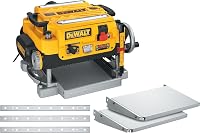
The DeWalt DW7351 Planer Folding Table fits the DW735 and includes 2 aluminum tables, each 13 inches long, plus mounting hardware. The tables fold and detach for storage or transport.
Choose these if your DW735 needs matching extensions and you want support attached to the machine. Skip them for another planer model, or if your existing extensions are sound and the unsupported board ends are the real problem.
After installation, check alignment rather than assuming the mounting hardware sets it automatically. Recheck after moving the planer or noticing a table has been bumped.
How should you set up infeed and outfeed support?
Place supports under the board's travel path, at a height that prevents sagging without lifting the stock off the planer bed. Keep enough clearance for the board to pass without hitting walls, benches, or stored tools.
With power disconnected, use a straightedge or suitable straight stock to check the relationship between the bed, extensions, and supports. A stand set too high can tip the board just as easily as missing support.
The SHALL 250-Pound Folding Roller Stand adjusts from 27.8 to 43 inches and uses an 11.5-inch polished steel roller. It folds for storage, has an eccentric foot for uneven floors, and has a 250 lb load capacity.
Choose it for long stock when you need support that can move between machines. Skip it if your planer bed falls outside its adjustment range or you lack room for a stable stand along the feed path.
This is 1 stand, so it supports one position at a time. If a board needs support on both sides, arrange both before starting rather than moving the stand during the cut.
Set the roller square to the feed direction and check that it turns freely. Keep the stock centered, and adjust the foot so the stand doesn't rock under changing board weight.
Will a dedicated planer stand reduce snipe?
A dedicated stand helps when the planer itself moves or sits poorly, but it doesn't replace infeed and outfeed board support. Buy a machine base to solve a mounting or workspace problem.
The VEVOR Thickness Planer Stand has a metal top, a middle storage platform, casters, and a foot-operated lock. Its 3 height settings are 30.5, 33.5, and 35.4 inches, and its load capacity is 100 lb.
Choose it if you need a dedicated base that can move into an open feed area. Skip it if your planer already sits securely or the combined supported load exceeds its capacity.
Check the machine footprint and mounting-hole alignment before choosing the base. Add the height of the planer's bed above its feet to the stand height when checking compatibility with separate board supports.
Engage the foot lock before feeding stock and confirm the base stays still. Keep the feed path clear of cords and dust hoses so neither pulls against the machine or catches a board.
How do you feed a board without tipping it?
Let the feed rollers control the board's speed, and guide the stock only as the manual directs. Don't pull from the outfeed side or push hard from behind to hurry the cut.
Support the board's weight without steering its end upward. Arrange long-board support before switching on the planer so you aren't chasing a sagging end midway through the pass.
If a helper is allowed by the manual, agree on who guides and who supports. Both people should maintain the same board path without pushing or pulling against each other.
Use light finishing cuts within the planer's limits as you approach final thickness. A lighter cut can reduce cutting load, but it won't correct a support that lifts the board.
Don't force bowed or twisted stock flat with your hands. A thickness planer needs a suitable reference face; planer vs jointer explains which machine prepares that face.
What should you check if snipe keeps happening?
Check support, alignment, and machine adjustment in that order, changing one factor at a time. Comparing similar boards makes the effect of each change easier to see.
Leading-end snipe calls for checking the entry path and infeed support. Trailing-end snipe calls for checking outfeed support and whether the remaining board weight tips the stock as it leaves the infeed roller.
These patterns are clues, rather than proof of a single cause. If both ends remain affected, follow the manual's checks for the cutter head assembly and use a head lock if the model requires one.
With power disconnected, remove chip buildup and inspect the bed and rollers as directed. Use only approved cleaning products and lubricants, keeping lubricants off surfaces that must grip the wood.
Keep the chip outlet clear and use suitable extraction. If chip handling is also a shop problem, see dust collectors for a small shop and check your planer's connection requirements.
Stop repeating passes if the board is nearing final thickness. Contact the manufacturer when normal setup checks don't solve the problem, rather than adjusting internal parts without instructions.
Can you remove snipe after a cut?
Remove snipe by trimming the damaged ends or lowering the surrounding face until it meets the depression. Check your remaining length and thickness before choosing either approach.
A shallow finishing pass won't necessarily reach the bottom of an existing dip. Repeated passes also risk creating fresh snipe if the original setup problem remains.
For rough stock, leave extra length when the project allows, then trim after planing. Base that allowance on the affected area you actually see rather than assuming every machine leaves the same length of snipe.
Don't feed a short offcut through to recover a small piece. Extra support doesn't make stock below the planer's minimum length safe to plane.
Which support should you choose to avoid planer snipe?
Choose the support that fixes the movement you've identified. Knowing how to avoid snipe on a planer starts with a stable feed path, not a shopping list.
- Choose the DW7351 tables when your DW735 needs attached support close to the cutter.
- Choose the SHALL roller stand when long boards sag beyond the existing tables.
- Choose the VEVOR stand when you need a dedicated machine base, after checking load and mounting fit.
- Buy nothing yet if your current supports only need cleaning, alignment, or a better position.
Table extensions and a roller stand can work together because they support different parts of a long board. A machine base serves a separate job beneath the planer.
If you're replacing the planer, compare best thickness planers and the DW734 vs DW735 comparison. Keep enough room in the shop plan for the board's full travel, whichever machine you choose.
Frequently asked questions
What causes snipe on a planer?
Snipe happens when the board or cutter head shifts enough to make a deeper cut near an end; the change often occurs as a feed roller engages or releases the stock. Sagging boards, poorly aligned extensions, and movement in the machine setup can contribute to the problem.
How do I avoid snipe on a planer?
Keep the board level with stable infeed and outfeed support, align the tables as your manual directs, and let the feed rollers move the stock. Use light finishing passes within the machine's limits; if snipe remains, change one setup factor at a time and compare the affected ends.
Should I push down on the board while planing?
Don't use heavy downward pressure to control snipe; guide and support the stock only as your manual directs, keeping your hands outside the openings. If feeding requires force or the board stalls, stop the machine and disconnect power before checking support height, chips, and the machine's setup.
Can I plane away snipe after it happens?
Yes, but removing the dip requires lowering the surrounding face to the same depth, which costs thickness. Correct the cause before making another pass and confirm that enough material remains; if the project allows it, trimming the affected ends usually preserves more thickness than planing the entire face again.