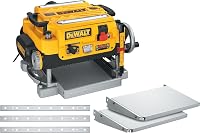
DeWalt DW734 vs DW735: Which Planer? (October 2026)
For DW734 vs DW735, choose the DW734 for occasional stock preparation with included tables; choose the DW735 for regular milling and a separate finishing feed setting. Pick the DW735X if you also need tables and spare knives.
On this page (11 sections)
- DW734 vs DW735: which differences matter most?
- How much does the extra cutting width matter?
- What do the two feed settings change?
- How should you plan chip collection?
- Will either carriage lock prevent snipe?
- What should you set up before the first pass?
- Which mistakes waste the most wood?
- How do you keep the planer cutting cleanly?
- Which planer fits a small shop?
- Is the DW735X a better buy than the DW735?
- DW734 vs DW735: make the choice around your next projects
In the DW734 vs DW735 comparison, choose the DW734 for occasional stock preparation with included tables, or the DW735 for regular milling with a separate finishing feed setting. The DW735X suits a new setup that also needs tables and spare knives.
Your board sizes and work habits should settle the choice. A second feed setting helps when you separate rough dimensioning from final passes, while included support tables matter when you're building a planer station from scratch.


DW734 vs DW735: which differences matter most?
The DW735 gives you more control over the milling process, while the DW734 covers straightforward thicknessing with included stock support. Neither replaces proper board preparation, sharp knives or a clear feed path.
All 3 models have a 15 amp motor and a three-knife cutter head. That shared motor size makes feed options, board capacity and accessories more useful buying criteria than motor amperage.
Start with the widest board you expect to keep whole. Then decide whether you want to change feed settings between removing material and preparing the surface for sanding or scraping.
The table below brings the main differences together. Use it to rule out a capacity mismatch before deciding which package fits your shop.
| Product | Best for | Cutting width | Cuts per inch | Included accessories | Our score |
|---|---|---|---|---|---|
| DeWalt DW734 12.5-Inch Benchtop Planer | occasional milling | 12.5 in | 96 | Infeed and outfeed tables, dust hood | 9.0 |
| DeWalt DW735 13-Inch Thickness Planer | regular milling | 13 in | 96 or 179 | Dust hose adapter, crank handle, blade-change T-wrench | 8.7 |
| DeWalt DW735X 13-Inch Thickness Planer | first planer setups | 13 in | 96 or 179 | Infeed and outfeed tables, extra set of knives | 9.4 |
Who should choose the DW734 versus the DW735?
Choose the DW734 for project-by-project milling when your stock fits and you expect to do further surface preparation after planing. It suits a woodworker making shelves, rails or furniture parts without needing a separate finishing feed mode.
Skip it if your planned boards exceed its opening or you specifically want to switch feed settings for final passes. Those are working limits that accessories cannot change.
Choose the DW735 for repeated batches of stock, especially when you want separate dimensioning and finishing stages. Its automatic carriage lock also removes a manual engagement step from the routine.
Skip the base package if you need included tables and spare knives immediately. The DW735X is the more direct match for that setup.
How much does the extra cutting width matter?
The extra capacity matters only when it lets a planned board pass through whole. The DW734 accepts stock up to 12.5 in wide, while the DW735 and DW735X accept up to 13 in.
That half-inch can decide the purchase for wide shelf boards or panels. For narrow furniture parts, it adds little practical value because both machines already accommodate the work.
Measure rough stock at its widest point rather than relying on a nominal lumber size. An uneven edge or an irregular section can turn an apparently suitable board into a poor fit.
If you plan to glue up wide panels, consider thicknessing the separate boards before assembly. You still need to keep their thickness consistent and allow for glue-up alignment and final surface work.
Neither option is a solution for panels wider than its opening. Plan another flattening method for those projects instead of forcing oversized material into the machine.
What do the two feed settings change?
The DW735's second setting gives you more knife cuts along each inch of board, which is useful for final surface preparation. DeWalt recommends 96 cuts per inch for dimensioning and 179 for a finer finish; the DW734 uses the lower figure.
Think of dimensioning as bringing rough stock close to the size you need. The finishing stage uses lighter passes as you approach the final thickness.
More cuts per inch do not remove tearout risk in difficult grain. Sharp edges, a sensible cut depth and feeding with favorable grain still matter, especially around knots or reversing grain.
Don't remove more wood simply to use the finishing setting. Leave a small allowance during rough preparation, then make controlled final passes without taking the parts below their target size.
Keep enough thickness for any sanding or scraping that follows. A planer can produce consistent dimensions while still leaving surface work to do before applying a finish.
How should you plan chip collection?
Plan a clear, compatible chip path before the first board. The DW735 and DW735X have fan-assisted chip ejection, while the DW734 includes a dust hood.
The fan moves chips away from the cutter head and out of the machine. You still need suitable collection equipment and hose connections, plus a plan for airborne dust.
Route the hose so it cannot catch a board or interfere with the thickness controls. Avoid a cramped location where the hose must bend sharply against a wall.
Check the collection container during longer batches because planer chips can fill it quickly. A restricted hose or full container can interrupt work and leave chips where they should not collect.
Our guide to dust collection for a small shop can help you plan the equipment around your space. For the wider layout, see benchtop workshop machines for a home shop.
Will either carriage lock prevent snipe?
Both locks help control carriage movement, but board support still affects snipe. The DW734 has a four-column carriage lock; the DW735 and DW735X use an automatic lock that needs no manual engagement.
Snipe is a deeper cut near the leading or trailing end of a board. It matters most when that end must remain part of the finished piece.
Set up the tables as the manual directs and support long stock without lifting it above the intended feed plane. A poorly placed roller stand can tip a board just as an unsupported end can.
Where the project allows, leave extra length and trim the ends after milling. Don't plan every blank at its exact finished length before you know how the setup handles it.
If snipe appears, check table alignment, support and feed technique before changing several adjustments at once. Our guide to stopping planer snipe explains how to work through those causes.
What should you set up before the first pass?
Prepare a stable machine, a straight board path and suitable stock before adjusting the cutting depth. The planer should sit securely without rocking, and the work area must let each board travel fully through.
Read the exact model's manual for mounting, electrical requirements, guards and minimum stock dimensions. Wear eye and hearing protection, keep loose clothing clear and leave guards in place.
Check the board for nails, screws, grit and loose debris. Reclaimed lumber needs particular care because hidden metal can damage knives and create a hazard.
A thickness planer follows the face resting on its bed. For predictable results, start with a stable reference face rather than expecting the machine to remove twist from an unsupported rough board.
Read planer vs jointer if you're unsure how to create that reference face. Our how to use a thickness planer guide covers the feed sequence and basic workflow.
Set the first cut from the thickest area
Start with a light cut based on the board's thickest section. Setting the head from a thinner end can leave the cutter taking too much wood when a thicker area reaches it.
Both model families have a material removal gauge, a thickness scale and a turret depth stop. Use the gauge to judge the next cut and the stop to return near a common thickness.
Measure the board itself as you approach the target. A familiar stop position is a starting point, while the finished part must match the dimensions your project requires.
Which mistakes waste the most wood?
The most costly mistakes are deep cuts, poor reference faces and milling below the target thickness. Better planning usually saves more material than rushing through fewer passes.
Don't treat the maximum cutting depth as the right setting for every board. Wide stock and difficult grain call for a more cautious cut, within the manual's limits.
Work in batches when several parts need the same thickness. Bring the group through each stage before lowering the head again, and check representative pieces with the same measuring tool.
Mark the reference face and grain direction when they are easy to identify. Those marks help you keep a consistent approach as a stack of similar boards moves through the shop.
Let the feed mechanism move the stock rather than trying to accelerate it by pushing. Keep your hands away from the openings, and never reach inside to retrieve a stalled piece.
Stop and disconnect power before clearing a blockage or inspecting the cutter area. A board that stops feeding calls for a check of the cause, not more force.
How do you keep the planer cutting cleanly?
Keep knives sharp and the bed and feed surfaces clean. Resin, debris and worn cutting edges can spoil the result even when the thickness setting is correct.
Disconnect power before maintenance, knife work or internal cleaning. Follow the manual's method and use only compatible cleaning products and lubricants where directed.
Watch for repeated ridges, torn grain or worsening feed behavior. A nicked knife may leave a raised line along the board, while poor feeding can point to dirty surfaces or another setup issue.
The DW734 uses reversible, disposable knives. Follow the specified knife procedure rather than trying to sharpen or modify an edge that is meant to be reversed or replaced.
Keep knife sets matched to the exact model and replace them according to its instructions. Spare knives reduce the chance that a damaged edge stops a project midway through a batch.
After knife work, make a light pass on suitable scrap and inspect both the surface and thickness. That check can reveal an installation or adjustment problem before you feed valuable stock.
Which planer fits a small shop?
Choose by operating space rather than body size alone. A planer that fits on a bench can still be awkward if a board hits a wall halfway through the pass.
The DW734 measures 23.38 x 16.52 x 20.48 in in length, width and height. The DW735 measures 24.13 x 22 x 18.1 in, while the DW735X measures 24.58 x 22 x 20.97 in.
Mark the machine footprint, then lay out the path of your longest regular board on both sides. Include room for support stands, the dust hose and safe access to the controls.
The DW734's included tables provide 33.5 in of material support. Longer boards still need suitable support beyond the machine, so table length does not replace planning the full feed path.
If storage requires moving the planer, plan the move before choosing a bench. The DW735X weighs 102 lb, which calls for a suitable stand and a safe handling arrangement.
Our thickness planer buying guide helps you weigh capacity against the space and work your shop can accommodate.
Is the DW735X a better buy than the DW735?
Choose the DW735X when its included accessories fill real gaps. It adds infeed and outfeed tables and an extra knife set to the core cutting features shared with the DW735.
For a first planer station, those parts give you table extensions and a replacement knife set from the start. You still need to arrange mounting, chip collection and support for long stock.
The DW735 includes a dust hose adapter, crank handle and blade-change T-wrench. If you already have suitable support equipment and a knife replacement plan, that package may fit your needs.
Don't choose the X package expecting more cutting capacity or another feed mode. Its main advantage is the accessory bundle, rather than a different thicknessing process.
Our DeWalt DW735X review looks more closely at that package if you're deciding between the two versions.
DW734 vs DW735: make the choice around your next projects
Pick the DW734 when your planned stock fits and a single feed setting suits your workflow. Put the rest of your setup effort into stable mounting, chip collection and reliable board support.
Pick the DW735 when you'll use separate dimensioning and finishing stages. Choose the DW735X instead when you also need its tables and replacement knives.
Before ordering, write down your widest board, longest regular blank and current support equipment. Those 3 checks turn the DW734 vs DW735 decision into a clear match between the machine and your work.
If your projects fall outside either model's capacity, compare the best thickness planers before committing to a setup.
Frequently asked questions
What is the main difference between the DW734 and DW735?
The DW735 adds a wider cut and a separate finishing feed setting. It handles boards up to 13 in wide, compared with the DW734's 12.5 in capacity, and also adds fan-assisted chip ejection and an automatic carriage lock for a different stock-preparation workflow.
Does the DW734 or DW735 include infeed and outfeed tables?
The DW734 includes extra-long infeed and outfeed tables that provide 33.5 in of material support. For the two-speed model, choose the DW735X package if you need tables included; it also comes with spare knives, while the DW735 includes a dust hose adapter, crank handle and blade-change T-wrench.
Is the DW735X the same planer as the DW735?
The DW735X shares the DW735's core cutting features, including its width, two feed settings, chip-ejection fan and automatic carriage lock. The main buying difference is the package: the DW735X includes infeed and outfeed tables plus an extra knife set, rather than offering a larger cutting capacity.
Which DeWalt planer has two feed speeds?
The DW735 and DW735X offer 96 or 179 cuts per inch, while the DW734 has a single 96 cuts-per-inch setting. DeWalt recommends the lower setting for dimensioning and the higher setting for a finer finish; grain direction, knife condition and pass depth still affect the surface.