DeWalt DW735X Thickness Planer Review: Worth It? (October 2026)
The DeWalt DW735X suits regular furniture and cabinet work with its 13-inch capacity, two feed speeds and included tables. Choose it if you can give this 102 lb planer a stable home and collect its chips.
On this page (9 sections)
- What makes the DeWalt DW735X worth choosing?
- Does your shop have room for the DW735X?
- How do the feed speeds and cutterheads compare?
- What should you check before the first board?
- What should you know about chip collection?
- How can you reduce snipe and avoid wasted boards?
- Which alternative fits your work better?
- How should you care for the planer between projects?
- Should you buy the DeWalt DW735X?
The DeWalt DW735X is a strong choice for regular furniture and cabinet work when you want control over stock thickness and finishing passes. Its 13-inch capacity, two feed speeds and included tables suit a shop that prepares lumber often.
The main buying question is whether you can give it a stable place to work. Frequent lifting and poor chip collection can make an otherwise useful planer awkward to use.
Choose around your boards, workflow and available space, rather than motor size alone. The alternatives below suit different stock widths and blade-care preferences.
What makes the DeWalt DW735X worth choosing?
The DW735X earns its place through feed-speed choice, automatic carriage locking and useful setup controls. These features matter most when you're bringing several boards to a matching thickness, then making lighter final passes.
DeWalt DW735X 13-Inch Thickness Planer: Best for regular furniture building
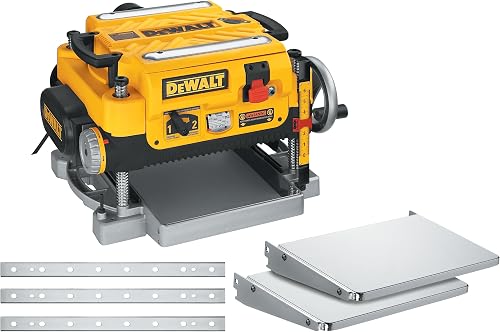
- 13 in cutting width
- Two feed speeds: 96 or 179 CPI
- Three-knife cutterhead
- Infeed and outfeed tables included
Choose the DW735X for repeated stock preparation and a choice of feed speeds. Included tables and spare knives help with setup and upkeep, while its weight favors a dedicated stand.
Pros
- Two feed speed options
- Automatic carriage lock
- Material removal gauge and depth stop
- Includes tables and an extra set of knives
Cons
- 102 lb weight makes frequent lifting awkward
- Chip ejection requires a collection setup
Its three-knife cutterhead runs at 10,000 rpm, driven by a 15 amp motor. The material removal gauge helps you judge the next cut, while the thickness scale gives you a reference as you approach your target.
The turret depth stop is useful for returning to common thicknesses. Use it to repeat a setting, then measure the wood itself before committing the whole batch.
DeWalt includes an extra set of knives, which gives you replacements ready when the cutting edges need attention. That is useful for ongoing projects, but clean stock and careful handling still matter for knife life.
Skip this model if you mostly buy lumber already at its final thickness and rarely need to resize it. A planer makes more sense when control over board thickness solves a regular project need.
How to use the DW735X feed-speed choice
Use the higher cuts-per-inch setting for light finishing passes and the lower setting when working toward thickness. More cuts along the board can leave finer cutter marks, but grain direction and sharp edges still affect the surface.
A slower finishing pass cannot repair deep tearout left by an earlier heavy cut. Reduce removal as you approach the final size, and leave enough material for sanding or other surface preparation.
Follow DeWalt's instructions for shifting the gearbox. Don't guess at the procedure or assume the feed-speed control works like another machine's.
Does your shop have room for the DW735X?
The DW735X works best on a sturdy bench or dedicated stand with a clear board path. Its 102 lb weight makes repeated moves from a shelf to a bench an awkward routine.
The machine measures about 24.58 inches long, 22 inches wide and 20.97 inches high. Those dimensions describe the machine, not the full working area.
Plan space for a board to enter and leave without hitting a wall, shelf or parked tool. For long stock, check the travel path at working height before you settle on a location.
Include room for the collection hose and for you to move safely between the feed and exit sides. A cramped outfeed area can force you to handle a board poorly just as it leaves the cutterhead.
A mobile stand can help a shared garage, provided it supports the load and locks securely during use. Our guide to benchtop workshop machines can help you plan machine placement and shared floor space.
If the layout still feels forced, compare other formats in the best thickness planers guide before choosing a machine.
How do the feed speeds and cutterheads compare?
The DW735X gives you a choice of cuts per inch, while the alternatives offer different widths or cutting-edge arrangements. Pick the feature that changes your work, rather than treating every number as a measure of finish quality.
| Planer | Cutting width | Cutterhead and feed details |
|---|---|---|
| DeWalt DW735X | 13 in | Three knives; 96 or 179 CPI |
| DeWalt DW734 | 12.5 in | Three knives; 96 CPI |
| WEN PL1326 | 13 in | 26 staggered, rotatable HSS blades; 26 ft per minute |
| Craftsman CMEW320 | 12.25 in | Two knives; 8,000 rpm cutterhead |
CPI describes cut spacing, feed rate describes board travel, and rpm describes rotation. You cannot compare those figures as if they were the same measurement.
All four machines have corded power and 15 amp motors, so amperage alone does little to separate them. Board fit, feed control, knife care and shop layout are more useful buying filters.
Measure the widest stock you regularly use, including glue-ups if you plan to surface them. A small capacity difference matters when your common workpiece sits right at the limit.
What should you check before the first board?
Start with secure mounting, aligned support and clean lumber. A planer relies on the lower face of the board as its reference, so preparing that face matters as much as adjusting the machine.
A thickness planer does not reliably turn a twisted board into a flat one by itself. Feed rollers can press a flexible board down during the cut, and the board may spring back afterward.
Use an appropriate flattening method before thicknessing rough stock. The planer vs jointer guide explains why these tools handle different parts of board preparation.
Before feeding lumber:
- Check for metal, loose knots, grit and other debris.
- Confirm that board length, thickness and condition meet the manual's limits.
- Set the tables and any extra supports according to the manual.
- Check that the chip path is connected and clear.
- Find the board's thickest area before setting the first pass.
Wear eye and hearing protection, keep loose clothing clear, and keep hands away from the openings. Let the feed system move the board instead of pushing or pulling it through.
What should you know about chip collection?
The DW735X uses fan-assisted chip ejection, so arrange collection before you begin. Ejecting chips from the cutterhead is only part of the job; those chips still need somewhere to go.
The package includes a dust hose adapter and dust-ejection chute. Choose compatible collection equipment and hose connections using the machine's instructions, rather than assuming any shop vacuum setup will suit it.
Route the hose so it cannot kink, catch on a passing board or pull loose. Check the collection container during longer batches, since planing can fill it quickly.
Stop and disconnect power before clearing a blockage. Never reach into the chute or try to clear chips while the machine is running.
The small-shop dust collector guide helps with equipment choices. For broader layout decisions, see shop setup and dust control.
How can you reduce snipe and avoid wasted boards?
Reduce snipe with correct table setup, level board support and controlled passes. The DW735X's automatic carriage lock limits movement that contributes to snipe, but it cannot support a long board hanging beyond the tables.
Snipe is a deeper cut near a board's end. Check a practice offcut before running valuable project parts, especially after moving the machine or adjusting its supports.
Support long stock without lifting it above the intended feed path. A support set too high can change how the board meets the bed just as a low support can let it sag.
Leave extra length for trimming when your stock and project allow it. That gives you room to remove affected ends without losing a finished part.
Other common mistakes deserve equal attention:
- Taking too much in one pass: use lighter cuts on wide stock and difficult grain, within the manual's limits.
- Chasing the scale alone: measure actual thickness at several points before the final passes.
- Changing grain direction blindly: inspect the grain and reduce the cut when fibers begin to tear.
- Finishing boards one at a time: bring a batch through shared settings when matching thickness matters.
Don't plane below your target while trying to remove every surface mark. Leave a small allowance for final preparation, especially on parts that must match.
Our guide to stopping snipe on a planer covers support and handling in more detail. Use DeWalt's support resources for the model's setup and operating instructions.
Which alternative fits your work better?
Choose the DW734 for narrower furniture stock, the WEN for individual rotatable blades, or the Craftsman for occasional narrow-board work. Each solves a different buying need, so none requires you to copy the DW735X feature for feature.
DeWalt DW734 12.5-Inch Benchtop Planer: Best for narrower furniture stock

- 12.5 in cutting width
- Three-knife cutterhead
- 96 CPI
- Four-column carriage lock
The DW734 suits furniture parts that fit its narrower capacity and builders who don't need a second feed setting. Its long tables and carriage lock support careful stock preparation.
Pros
- Reversible disposable knives
- Four-column carriage lock
- 33.5 in of material support from its tables
Cons
- Less width than the DW735X
- No second feed setting
The DW734 suits builders making rails, stiles, shelves and similar parts within its capacity. Its four-column carriage lock and tables providing 33.5 inches of material support make it a sensible option when you don't need a second feed setting.
Its disposable knives are reversible, giving you another cutting edge before replacement. Skip it if your usual boards need the extra width or you specifically want the DW735X's finishing-feed choice.
The DW734 vs DW735 comparison helps you decide which DeWalt feature set fits your work.
WEN PL1326 13-Inch Spiral Planer: Best for rotating individual blades

- 13 in cutting width
- 26 staggered, rotatable HSS blades
- 26 ft per minute feed rate
- Cast iron base
Choose the WEN if you prefer caring for individual rotatable HSS blades instead of full-width knives. It retains wide-board capacity but has one feed speed.
Pros
- Rotatable HSS blades
- Cast iron base
- Height-adjustable feed tables
- Adjustable dust port
Cons
- Single feed speed
- Individual blades create more cutting edges to inspect
The WEN PL1326 suits buyers who prefer rotating individual HSS blades rather than maintaining full-width knives. Its height-adjustable feed tables and cast iron base also make it worth considering for a fixed workstation.
Don't choose it solely because the cutterhead is called spiral. That design does not by itself guarantee quieter operation, better results on every grain pattern or less maintenance.
Skip the WEN if changing feed speed is central to your workflow. Its individual blades also mean more cutting edges to inspect and keep track of during service.
Craftsman CMEW320 12.25-Inch Planer: Best for occasional narrow-board projects

- 12.25 in cutting width
- 15 amp motor
- Two-knife cutterhead
- Vacuum port
The CMEW320 suits occasional shelf, rail and frame projects made from narrower stock. Its reversible knives and vacuum port cover basic thickness-planing needs without the DW735X's feed-speed choice.
Pros
- Quick-change cutterhead
- Reversible, double-edged knives
- Vacuum port
Cons
- Narrowest capacity in this group
- No two-speed feed choice
The Craftsman CMEW320 suits occasional projects built from stock that fits its narrower opening. Its quick-change, two-knife cutterhead uses reversible, double-edged high carbon steel knives, and a vacuum port provides a chip-collection connection.
It is the lightest machine here at about 61 lb, which helps if storage involves moving the planer. It still needs secure support, and its weight alone does not make repeated lifting convenient.
Skip it for boards beyond its capacity or if you want the DW735X's feed-speed choice. For straightforward thicknessing, focus on stock fit and a workable collection setup.
How should you care for the planer between projects?
Keep the bed, rollers and cutting edges clean, using the care methods allowed in the manual. Dust, resin and dull edges can affect feeding and surface quality even when the height setting is correct.
Disconnect power before cleaning or opening covers. Avoid applying cleaners or lubricants to rollers unless the manual specifically allows them.
A narrow ridge running along the board can point to a nicked cutting edge. Inspect the knives and follow the correct service procedure instead of making repeated passes and removing useful thickness.
Don't adjust knife positions or reverse edges unless that model's instructions permit it. Store spare knives in protective packaging so their edges cannot strike tools or exposed metal.
After moving the planer, check its mounting, tables and supports again. A short setup check is easier than correcting a batch of mismatched parts.
Should you buy the DeWalt DW735X?
Buy the DeWalt DW735X for regular stock preparation when you have room for a dedicated setup and will use its feed-speed choice. Its package makes the most sense for builders who repeatedly bring boards to matching dimensions.
Choose the DW734 when narrower stock covers your projects, or the WEN when individual blade rotation is your priority. The Craftsman fits occasional narrow-board work, especially when lower machine weight matters.
Before ordering, check your widest board, support surface and collection connection. Then use the guide to using a thickness planer to plan your first batch.
Frequently asked questions
What is the DeWalt DW735X cutting width?
The DW735X has a 13 in cutting width; measure rough boards at their widest point before feeding them, since uneven edges can make nominal lumber sizes misleading. A thickness planer brings the upper face parallel to the lower reference face; it does not straighten an edge for you.
Does the DW735X have more than one feed speed?
Yes, the DW735X offers 96 or 179 cuts per inch through its two-speed gearbox; the higher setting puts more knife cuts along each inch of wood, which is useful for lighter finishing passes. Follow DeWalt's instructions for changing speeds, and still leave room for sanding before applying a finish.
Does the DeWalt DW735X include planer knives?
The DW735X includes its three-knife cutterhead and an extra set of knives, plus infeed and outfeed tables; keep the spare set protected from moisture and accidental edge damage. Disconnect power before knife work, follow the replacement procedure, and confirm that any future replacements fit this exact model.
How much does the DW735X weigh?
The DW735X weighs 102 lb, making a dedicated bench or stand more practical than frequent lifting; check the support's load rating for both the planer and your lumber. Plan a clear lifting route before setup, and allow enough room on each side for the boards you actually use.